
Google Chrome is adding a way to automatically group your tabs. This new feature will be available in the recently added tab search menu.
Organize Tabs
Google added a bunch of tab orgnization-related flags this morning to the Chromium Gerrit.
Tab Organization – Enables the Auto Tab Groups feature, which can be found within the Tab Search bubble.
Tab Organization Settings Visibility – Enables Auto Tab Groups suggestions for multiple tab groups at once.
Tab Reorganization – Enables Auto Tab Groups suggestions for adding tabs to existing groups
Tab Reorganization Divider – “Shows a divider in Auto Tab Groups suggestions for existing groups, indicating which tabs in the group are new.
Enabling these flags and restarting adds a new option to the Experimental AI section of theChrome Settings page:

Enable this and you’ll see a new section in the tab search menu called “Organize tabs”
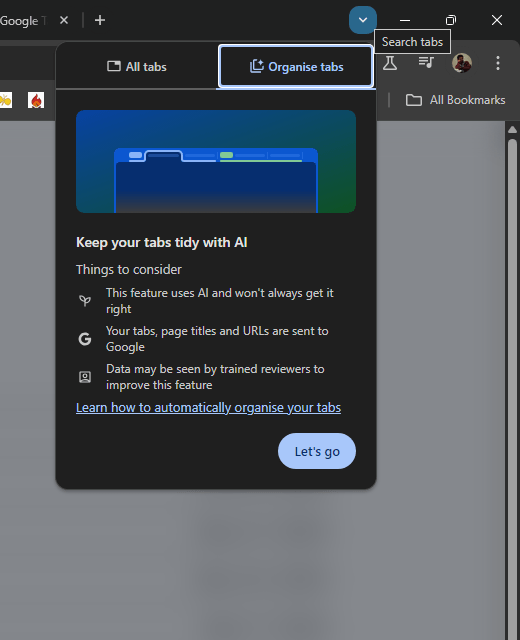
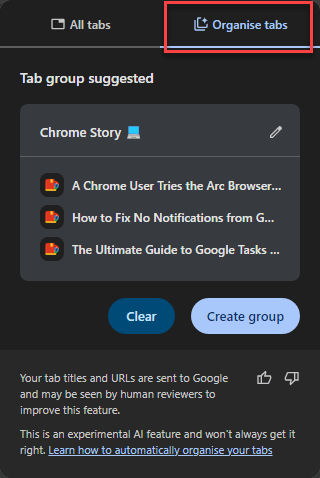
Click Create group to create a new tab group containing the recommended tabs.
Chrome assigns a name to the new tab group. You can change it by clicking the pencil icon next to the name.
You will also see this option in the Chrome menu as well.

This feature is currently available in the Canary channel of Chrome. You can expect this in Dev and Beta channels in coming weeks.
Questions, thoughts? Let me know in the comments section.


Leave a Reply