Home » Google Chrome » How to Stop Chrome Automatically Logging Into Websites

How to Stop Chrome Automatically Logging Into Websites

Updated On:

By

Google Chrome has a built-in password manager that can remember your passwords. It can also automatically log into websites where you have saved your credentials.

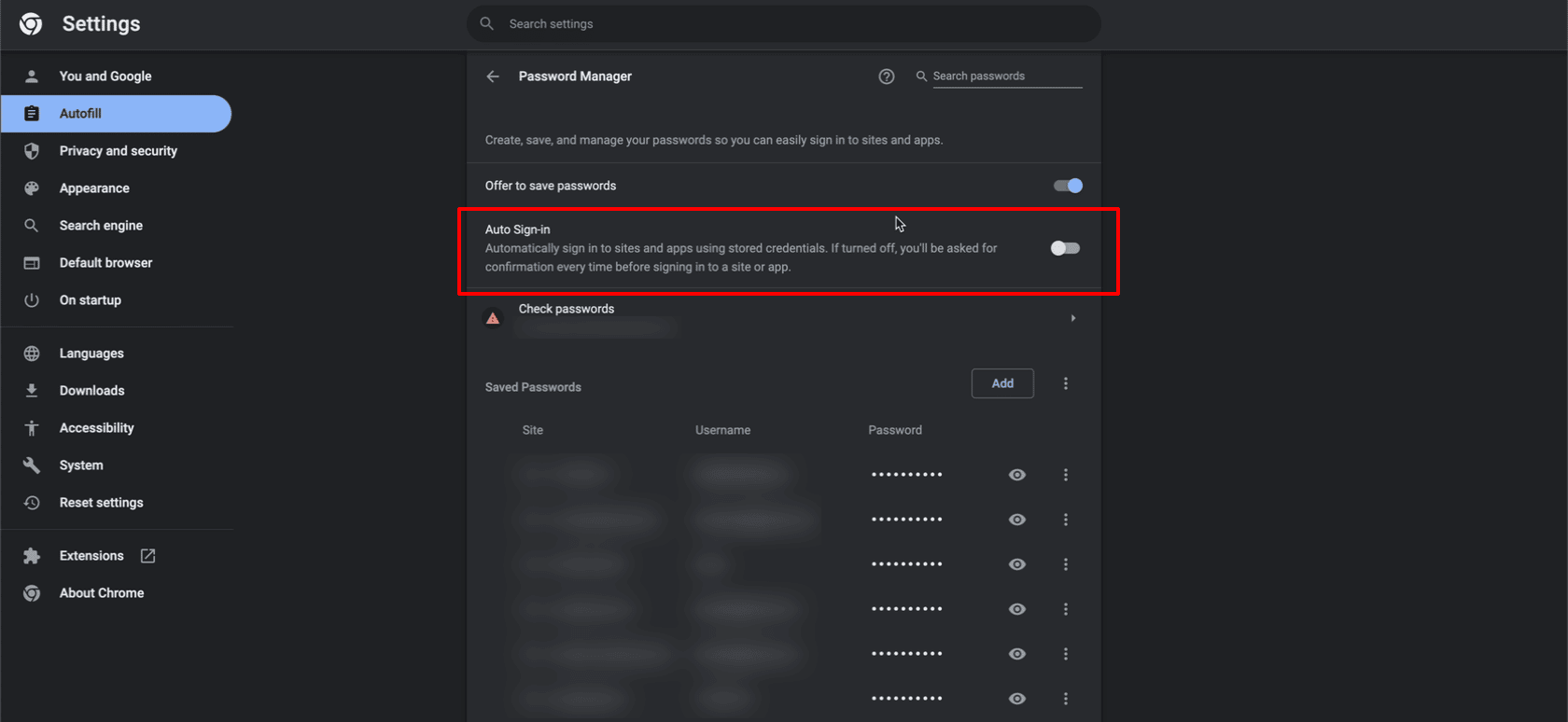
What if you want to disable this automatic login? Google Chrome has an option to stop automatically logging into websites.

Here is how to stop Chrome from automatically logging into websites:

  1. Click the three-dots settings icon.Chome Three Dots Settings Icon
  2. Choose Settings from the list.
    Settings in Chrome Menu
  3. Now click Autofill.Autofill Chrome Settings
  4. Select Passwords Manager from the list.Chrome Password Manager
  5. Switch Auto Sign-in off.Disable Chrome Auto Sign-in

You have stopped Google Chrome from automatically logging into websites. Restart Chrome and test this now.

Did you find this Google Chrome guide useful? Let me know in the comments section below.


Discover more from Chrome Story

Subscribe to get the latest posts sent to your email.

Tags:

7 responses to “How to Stop Chrome Automatically Logging Into Websites”

  1. RichardOfSCC Avatar
    RichardOfSCC

    Nice to know; but why would someone want the stop auto login?

    1. Jason Avatar
      Jason

      Because it’s a security hazard. Someone takes your laptop, opens your browser, boom- you’re logged in to whatever account chrome can.

  2. Jason Avatar
    Jason

    This doesn’t work.

    Chrome has been doing a new thing as of about 6-8 months ago where it’s logging in to gmail automatically. Autofill is off. I clear the cache, history, cookies, etc. every time but Chrome still does it.

    I installed a little applet to prevent it, but it’s now doing it again. And it started doing it for Amazon as well. (And probably a bunch of other sites).

    1. Sid Avatar
      Sid

      Hi Jason,

      Were you able to get a resolution for it? We are facing the same issue. Autofill is off, but still signs in automatically.

      1. Dinsan Avatar

        What if the cookie is already present – tried deleting cookies and see if it still logs you in automatically?

      2. Jason Avatar
        Jason

        This was a while ago, but I think I had whitelisted google drive in my browser settings. I wanted it to only work for drive but it was affecting all google services. Maybe look there.

  3. […] Don’t Use Autologin on Chrome: Sure, it saves you a few minutes over the course of a week, but the autologin feature on Chrome also sets you up to fail. This tool stores login tokens in your browser and means you don’t have to use your password to access sites each time. However, if a threat actor gains access to them – as they did in the attack on LinusTechTips – they can gain access to all of your accounts. Learn how to turn autologin off in this guide. […]

Leave a Reply

Discover more from Chrome Story

Subscribe now to keep reading and get access to the full archive.

Continue reading

Discover more from Chrome Story

Subscribe now to keep reading and get access to the full archive.

Continue reading