
Google Chrome now supports preloading of pages to increase browsing speed. This article explains how to enable and configure preloading.
Note: This is a new feature currently under development. You can enable this on the Dev channel of Chrome at the moment. If you are on the Stable channel, try again after a few weeks.
Enabling Preload
Preload is a new feature added to the Performance section of Chrome’s settings. To enable preload:
- Click the three-dots settings menu.

- Choose Settings.
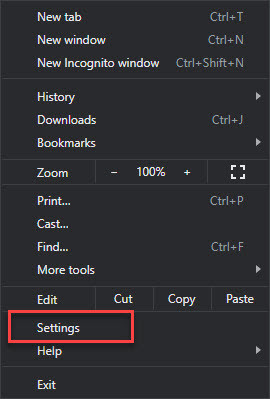
- From the left pane, select Performance.

- Under Speed, select one of the following:
- No preloading – Disables preload
- Standard preloading – Chrome preloads pages you’re likely to visit, so that they load more quickly when you visit them. If you allow cookies, Chrome may use them when preloading.
- Extended preloading – Browsing and searching is faster than standard preloading.
Chrome preloads even more pages that you’re likely to visit, so that they load more quickly when you visit them.
If you allow cookies, Chrome may use them when preloading.When a site asks to privately preload links on their page, Chrome uses Google servers. This hides your identity from the preloaded site, but Google learns what sites get preloaded.
- That’s it. Google Chrome will now preload websites based on your selection.

Did this increase browsing speed for you? Are you concern about privacy while using these settings? Let me know in the comments section below.

Leave a Reply